
Last updated on
Oct 31, 2026

Application for employment free printable template
pdfFiller is not affiliated with any government organization

Fill out
Complete the form online in a simple drag-and-drop editor.

eSign
Add your legally binding signature or send the form for signing.

Share
Share the form via a link, letting anyone fill it out from any device.

Export
Download, print, email, or move the form to your cloud storage.
Why pdfFiller is the best tool for your documents and forms


End-to-end document management
From editing and signing to collaboration and tracking, pdfFiller has everything you need to get your documents done quickly and efficiently.
Accessible from anywhere
pdfFiller is fully cloud-based. This means you can edit, sign, and share documents from anywhere using your computer, smartphone, or tablet.
Secure and compliant
pdfFiller lets you securely manage documents following global laws like ESIGN, CCPA, and GDPR. It's also HIPAA and SOC 2 compliant.
What is Application for employment
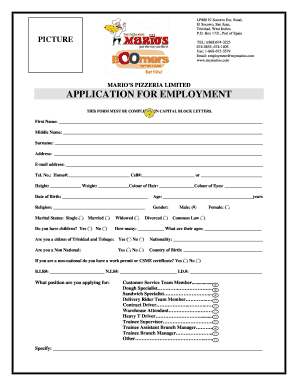
The Application for Employment is a document used by job seekers to formally apply for a position within a company or organization.
pdfFiller scores top ratings on review platforms




Does what I need, completing the use of PDF government forms that are professional and easier to complete, greatly aiding in their correct processing.
I love it....I am able to create and change flyers at will.
Who needs Application for employment?
Explore how professionals across industries use pdfFiller.

Application for employment is needed by:
-
Job seekers looking for employment opportunities
-
Human resources departments managing recruitment
-
Employers assessing candidate applications
-
Career counselors assisting clients with job applications
-
Educational institutions guiding students in job preparedness
Comprehensive Guide to Application for employment
What is the Application for Employment?
The Application for Employment form serves as a crucial document within the job application process. This form collects essential information from candidates to help potential employers assess qualifications and suitability for available positions. By utilizing this standard application, applicants can efficiently submit their details in a structured manner that aligns with hiring practices.
Understanding the Application for Employment is fundamental for both employers and job seekers, as it lays the groundwork for the recruitment process. The form not only facilitates a clear presentation of a candidate’s background but is also vital for achieving efficient data collection.
Purpose and Benefits of the Application for Employment
The Application for Employment is pivotal in ensuring a streamlined hiring process that benefits both job seekers and employers. A standardized application process minimizes discrepancies and ensures that employers can easily compare candidates based on similar criteria.
Having a uniform form offers several advantages:
-
Enhances the efficiency of processing applications.
-
Ensures that all necessary information is collected uniformly.
-
Helps employers maintain compliance with hiring regulations.
For applicants, utilizing this standardized application guarantees that their information is presented clearly, enhancing their chances of being shortlisted for interviews.
Who Needs the Application for Employment?
The Application for Employment is intended for a wide range of users within the job market. Individuals seeking job opportunities across various industries rely on this form to submit their qualifications effectively.
Additionally, employers and hiring managers benefit from standardized submissions, which simplify the review process. Common job roles that typically require this application include those in retail, healthcare, administrative positions, and skilled trades.
Eligibility Criteria for the Application for Employment
Eligibility to complete the Application for Employment generally includes prospective employees who meet specific job requirements. Typical criteria involve age restrictions, legal work status, and applicable experience levels.
Furthermore, there are federal and state-specific guidelines that govern who can apply. Potential exceptions may include internships or apprenticeships that might have different eligibility requirements.
How to Fill Out the Application for Employment Online
Filling out the Application for Employment online using pdfFiller is a straightforward process. Here’s a step-by-step guide to ensure your application is completed accurately:
-
Access the online form through pdfFiller.
-
Complete personal information sections like name, address, and contact details.
-
Add your work history relevant to the job you're applying for.
-
Review and ensure all fields are filled out correctly.
-
Save your filled form securely and prepare for submission.
By following these instructions, applicants can optimize their submission for clarity and professionalism.
Common Errors and How to Avoid Them
Many applicants make common mistakes when filling out the Application for Employment. Frequent pitfalls include:
-
Leaving mandatory fields empty.
-
Filling in incorrect information.
-
Submitting without reviewing for clarity.
To avoid these mistakes, it's crucial to double-check all entered information before submitting. Accuracy and clarity are key components in making a positive impression on potential employers.
Submission Methods and Delivery
Once the Application for Employment is completed, there are various methods to submit it. Candidates can choose from:
-
Online submission through company portals.
-
Emailing the form directly to hiring managers.
-
Delivering a printed copy in person.
After submitting, applicants should confirm receipt with the employer and may need to follow up regarding their application status.
How pdfFiller Can Help with Your Application for Employment
Using pdfFiller to fill out your Application for Employment has several benefits. This platform offers features specifically designed to improve the application experience, such as the ability to edit existing PDFs and create fillable forms easily.
The security measures implemented by pdfFiller, including 256-bit encryption, protect sensitive information. Additionally, with the ease of editing, saving, and sharing your completed application, pdfFiller significantly streamlines the application submission process.
What Happens After You Submit the Application for Employment?
After submitting the Application for Employment, applicants should be aware of what to expect next. Employers typically provide timelines for responses, which can vary based on the company’s hiring process and the number of applications received.
Next steps may include:
-
Scheduling interviews with selected candidates.
-
Providing further instructions for subsequent phases of the application process.
It's advisable for applicants to track their application status actively and remain prepared for communication from potential employers.
Next Steps Toward Securing Your Job Opportunity
After submitting the Application for Employment, candidates should focus on preparing for interviews. This preparation can include researching the company and practicing responses to common interview questions.
Networking plays an essential role as well; connecting with industry professionals can open additional opportunities. Utilize pdfFiller for future documentation needs to maintain a professional edge in your job search.
How to fill out the Application for employment
-
1.To access the Application for Employment form on pdfFiller, visit the pdfFiller website and use the search function to locate the specific form.
-
2.Once you find the form, click on it to open it within pdfFiller's user-friendly interface.
-
3.Before you start filling out the form, gather all necessary information such as personal details, employment history, and references.
-
4.Navigate through the form fields using your mouse or keyboard. Click into each field to input the required information.
-
5.Make sure to fill out all mandatory fields marked with an asterisk to avoid submission issues.
-
6.Take your time to accurately review the information you have entered, ensuring that there are no errors or omissions.
-
7.Once you've completed all sections of the form, use the preview option to view the entire document before finalizing.
-
8.To save your work, click the save button. You can choose to download a copy of the form to your device or submit it directly through pdfFiller.

Who is eligible to fill out the Application for Employment?
Any individual seeking a job position can fill out the Application for Employment, regardless of previous experience. Ensure you meet the specific job requirements outlined in the job listing.
What is the deadline for submitting the application?
Deadlines for submitting the Application for Employment vary by employer. Always check the specific job announcement or company website for the most accurate deadlines.
How do I submit the completed application?
After filling out the Application for Employment on pdfFiller, you can submit it directly through the platform or download it to email or print and submit manually, following the employer's instructions.
What supporting documents are typically required with the application?
Along with your Application for Employment, you may need to submit a resume, cover letter, and references. Check the job description for specific requirements.
What common mistakes should I avoid when filling out the application?
Common mistakes include failing to sign the application, neglecting to fill out required fields, and providing inaccurate information. Double-check your entries before submission.
What is the typical processing time for applications?
Processing times for applications can vary widely. Generally, you can expect to hear back from employers within a few weeks after the application deadline.
Is notarization required for the Application for Employment?
No, notarization is not typically required for the Application for Employment. However, some employers may have specific requests, so it's advisable to verify with them.
Related Content
Related Forms



Related Catalogs
Get the latest insights from our blog


If you believe that this page should be taken down, please follow our DMCA take down process
here
.
This form may include fields for payment information. Data entered in these fields is not covered by PCI DSS compliance.